
 Akanksha Soni
An employee time clock is an essential tool for businesses looking to simplify attendance management, reduce administrative errors and automate the calculation of working hours.
Until a few years ago, companies had limited options. They generally had to purchase a physical time clock with employee badges and install it at the workplace entrance. Today, however, the market offers much more flexible solutions, ranging from cloud-based software and PC time clocks to mobile apps and NFC-enabled terminals.
But how much does an employee time clock actually cost?
What are the differences between the available solutions? And, most importantly, how much should a business spend in 2026 to manage employee attendance effectively?
In this guide, we explore the prices, actual costs and benefits of the main time-tracking technologies, with a particular focus on modern digital solutions that allow businesses to get started without significant upfront investments.
What Is an Employee Time Clock?
An employee time clock is a device or software solution that allows employees to record when they start and finish work.
Clock-ins and clock-outs can be recorded using different methods, including:
- NFC or RFID employee badges
- Personal PIN codes
- Fingerprint recognition
- Smartphone applications
The objective is simple: accurately record working hours and make attendance information easier to manage.
Why Do Businesses Need an Employee Time Clock?
Manually managing working hours may seem straightforward when a business has only a few employees. However, as a company grows, several problems can arise:
- Errors in attendance records
- Difficulties calculating working hours
- Complicated vacation and leave management
- Time-consuming administrative tasks
- Disputes regarding employee attendance
A modern employee time clock helps automate attendance tracking.
Clock-in and clock-out records can be collected in real time and accessed by administrators, managers and HR professionals without relying on spreadsheets or manual records.
For businesses that want to centralise these activities, employee time tracking software can bring attendance records, working hours and employee management together in one cloud-based platform.
How Much Does an Employee Time Clock Cost in 2026?
One of the most common questions businesses ask is how much an employee time clock costs.
The answer depends on the type of system selected.
Indicative Employee Time Clock Prices
| Solution | Indicative cost |
|---|---|
| Excel spreadsheet | €0 |
| PC time clock or mobile app | A few euros |
| Physical badge terminal | €300–€1,000 |
| Biometric time clock | €500–€2,000 |
These are indicative price ranges, not fixed market quotations. Actual costs depend on the supplier, features, number of employees and installation requirements.
Many businesses focus only on the initial purchase price. However, the purchase cost is just one part of the overall investment.
To choose the right employee time clock, companies should also consider maintenance, software updates, technical support and the administrative time saved.
Employee Time Clock for PC: The Most Affordable Solution
In recent years, PC-based time clocks have become an interesting alternative to traditional attendance terminals.
Instead of purchasing a dedicated device, businesses can use an ordinary Windows computer as an employee clock-in station.
This approach can significantly reduce initial hardware costs.
How Does a PC Time Clock Work?
The process is straightforward.
Employees approach the computer used as the clock-in station and identify themselves using one of the supported methods:
- Personal identification code
- NFC badge
- RFID card
- Compatible PC/SC NFC reader
Once the employee is identified, the system records the clock-in or clock-out and synchronises the attendance information with the management software.
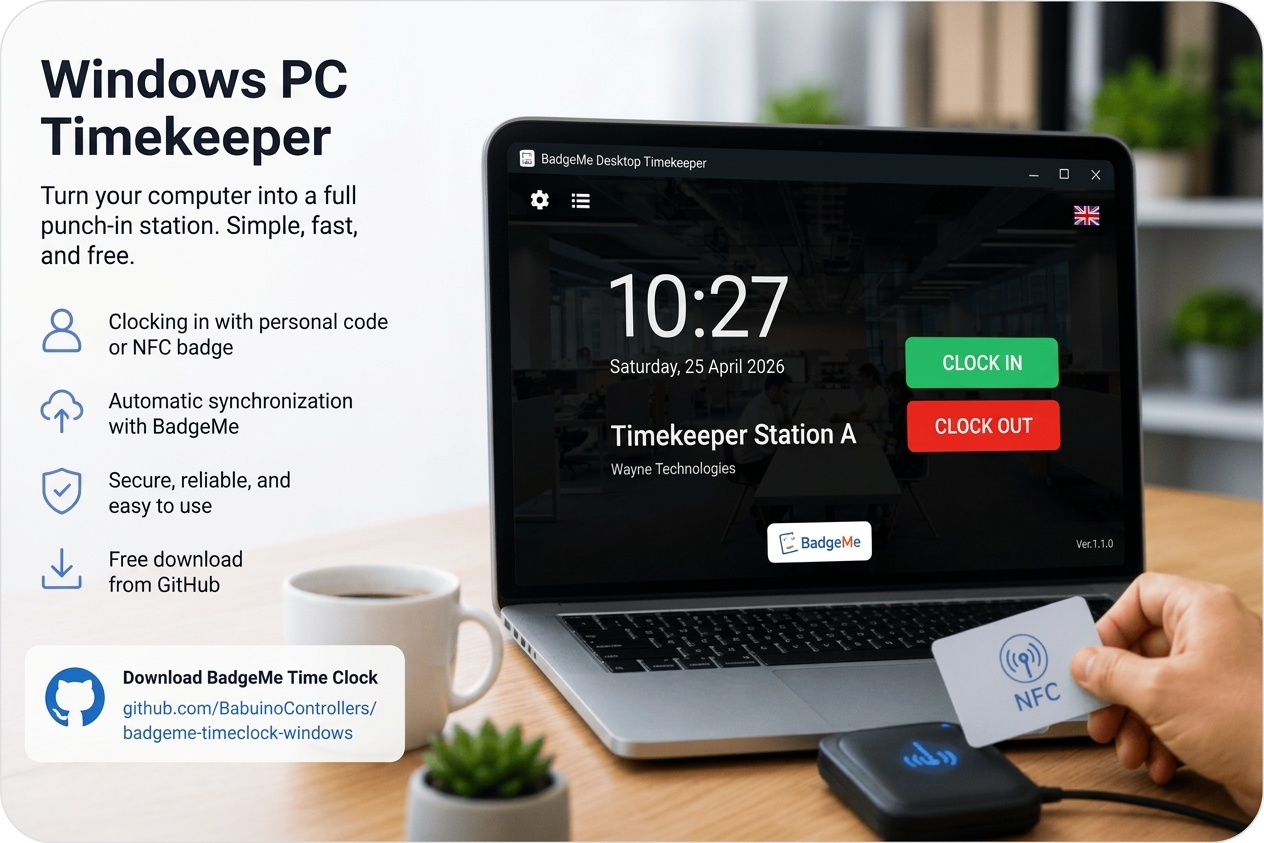
BadgeMe Time Clock: Free Time Clock Software for Windows
One interesting solution available today is BadgeMe Time Clock, the Windows time clock software developed by BadgeMe.
The software can be downloaded free of charge from GitHub and transforms an ordinary Windows PC into an employee attendance station.
Discover the BadgeMe PC Time Clock to learn more about this solution.
Unlike many traditional systems, it does not require businesses to purchase a dedicated time clock terminal.
No Additional Costs with the BadgeMe Free Plan
One of the most interesting aspects of BadgeMe Time Clock is that it can also be used with the BadgeMe Free plan, subject to the features included in that plan.
This allows small businesses to start recording employee clock-ins and clock-outs without purchasing physical terminals.
For startups, professional offices and small businesses, this can be a cost-effective way to introduce digital attendance tracking.
NFC Support and PC/SC-Compatible Readers
BadgeMe Time Clock supports two employee identification methods.
Personal identification code
Each employee can record attendance using their own identification code.
This is the simplest option to configure and does not require additional devices.
NFC badge
Businesses that prefer a faster identification method can use NFC badges.
The software supports NFC readers compatible with the PC/SC standard. The PC/SC Workgroup specifications describe interfaces that allow smart cards and compatible readers to work with computer systems.
This flexibility allows businesses to choose a suitable reader rather than being restricted to proprietary hardware.
When Should You Choose a PC Time Clock?
A PC-based employee time clock is particularly suitable for:
- Administrative offices
- Professional firms
- Agencies
- Retail stores
- Commercial businesses
- Coworking spaces
- Startups
In these environments, a shared computer may already be available and can be used as a clock-in station.
The financial advantage is clear: there is no need to purchase a dedicated physical terminal.
Employee Time Clock App: The Ideal Solution for Off-Site Workers
Not every employee works in an office or at a fixed company location.
Technicians, maintenance workers, sales representatives, remote employees and staff working at customer premises have different attendance-tracking requirements.
For this reason, mobile attendance applications have become an increasingly popular option.
A modern employee time clock app allows employees to record their clock-ins, clock-outs and breaks directly from their smartphones. Attendance information is then synchronised with the management platform.
Managers can check attendance records in real time without collecting information manually.
The main benefits include:
- Clocking in from different locations
- Immediate cloud synchronisation
- No need for paper attendance registers
- Better visibility of employee activities
- Fewer manual data-entry errors
For businesses with employees working across different locations, a mobile application is often a practical and flexible solution.
Discover the BadgeMe attendance app to learn how employees can record attendance using their smartphones and GPS-based features.
Employee Time Clock with a Physical Terminal
Despite the growth of cloud-based software and mobile applications, many businesses still prefer a dedicated physical time clock.
This option is particularly common in:
- Warehouses
- Manufacturing facilities
- Businesses with operational staff
- Companies with a large number of employees
In these environments, having a dedicated clock-in station can make attendance recording more convenient.
BadgeMe BM001: Physical Employee Time Clock Integrated with the Cloud
For businesses that prefer a dedicated device, BadgeMe offers the BM001 terminal.
It is an employee time clock designed to integrate directly with the BadgeMe attendance management platform.
Its main features include:
- Clocking in and out using NFC badges
- Automatic cloud synchronisation
- Centralised attendance management
- Simple configuration
- Continuous software updates
Unlike traditional mechanical time clocks, the BM001 makes attendance records available through the online management platform.
Discover the BadgeMe BM001 Employee Time Clock to explore its features and benefits.
Employee Time Clock: PC, Mobile App or Physical Terminal?
One of the most important decisions when choosing an attendance system is selecting the right technology.
The best option depends mainly on how the business operates.
PC Time Clock
Ideal for:
- Offices
- Professional firms
- Commercial businesses
- Companies with a shared clock-in station
A PC time clock turns an ordinary computer into an attendance station without requiring a dedicated terminal.
Smartphone App
Recommended for:
- Remote workers
- External technicians
- Sales representatives
- Maintenance workers
- Employees who travel between locations
A mobile app offers greater flexibility and allows employees to record attendance from different locations.
Physical Terminal
Particularly suitable for:
- Manufacturing facilities
- Warehouses
- Businesses with many employees
- Workplaces with frequent employee shift changes
A dedicated device such as the BM001 provides a quick and straightforward way to record employee attendance.
The good news is that businesses no longer need to choose only one method. Many companies combine PC time clocks, mobile apps and physical terminals to meet the needs of different teams.
How Much Does a Physical Employee Time Clock Cost?
When purchasing a physical terminal, businesses should consider several expenses:
- Initial device purchase
- Employee badges
- Installation
- Technical assistance, if required
Some systems that initially appear inexpensive can become more expensive over time because of additional costs.
For this reason, it is important to evaluate the total cost of ownership rather than looking only at the purchase price.
The Hidden Costs of an Employee Time Clock
Many businesses discover only after purchasing a system that the actual cost is higher than expected.
1. Attendance Management Software
A time clock records employee attendance, but businesses also need software to manage the collected information.
The software should help companies:
- Calculate working hours
- Manage vacations and leave
- Generate attendance reports
2. Installation and Configuration
Some systems require:
- Initial configuration
- Technical assistance
- Integration with other systems
These activities can increase the overall implementation cost.
3. Maintenance
Over time, businesses may need to pay for:
- Software updates
- Technical support
- Device replacement
The real cost is therefore the complete attendance management system, not just the hardware.
4. Administrative Time
One of the most significant hidden costs is time.
Every manual correction, verification or attendance check requires administrative effort. These minutes can quickly turn into substantial costs for a business.
A modern employee time clock should minimise these activities and make attendance management more efficient.
Accurate attendance records are also important when monitoring working hours and rest periods. Businesses operating in the European Union should be aware of the EU Working Time Directive, which establishes minimum requirements concerning working hours, breaks and rest periods.
You can also consult the full text of Directive 2003/88/EC on EUR-Lex.
Cloud-Based Employee Time Clock: Is It Worth It?
In 2026, cloud-based attendance software offers businesses a flexible way to manage employee working hours.
The main advantages include:
- Automatic updates
- Access from different devices
- No need for an on-site server
- Automatic backups, depending on the service
- Centralised attendance management
Cloud-based systems can also integrate several HR functions, including:
- Vacation management
- Leave requests
- Shift management
- Attendance reports
- Data exports for payroll and labour consultants
With BadgeMe employee time tracking software, businesses can manage attendance information through a centralised cloud platform.
How to Choose the Best Employee Time Clock
The right solution depends on the size of the business, the number of employees and how the workforce is organised.
Up to 10 Employees
For small businesses, a PC time clock can often be a suitable option.
It can keep initial hardware expenses low and is generally straightforward to implement.
From 10 to 50 Employees
In this range, cloud-based attendance software with NFC badge support or a mobile application can offer greater flexibility.
More Than 50 Employees
When the workforce grows, a dedicated terminal such as the BM001 can provide a convenient central clock-in point.
Businesses with multiple locations may also benefit from combining physical terminals with mobile attendance applications.
What Is the Most Affordable Employee Time Clock in 2026?
When considering the balance between cost and functionality, cloud-based systems and PC time clocks are among the most interesting options available to businesses.
For many companies, BadgeMe Time Clock provides an accessible starting point because it allows them to use an existing Windows computer instead of purchasing dedicated hardware.
Businesses that prefer a physical clock-in station can consider the BM001 while maintaining the benefits of cloud-based attendance management.
To compare the available options, visit the BadgeMe pricing page and review the plans and features that best suit your organisation.
Conclusion
Choosing the right employee time clock means finding the right balance between cost, simplicity and functionality.
In 2026, businesses do not necessarily need to invest hundreds or thousands of euros to start recording employee attendance.
With solutions such as BadgeMe Time Clock, companies can transform an ordinary Windows PC into a professional clock-in station, with support for personal identification codes and compatible NFC badges.
For businesses that prefer a dedicated device, the BM001 offers a physical attendance terminal integrated with the BadgeMe cloud platform.
By carefully evaluating prices, hidden costs and operational requirements, businesses can choose the most suitable system, avoid unnecessary investments and make employee attendance management simpler, more accurate and more efficient.
Related posts:
 HR Cloud Software for Employee Attendance: What to Look For and Why Businesses Choose BadgeMe
 Attendance Management: How GPS and Location-Based Attendance Works
 How Employers Can Simplify Leave Approval and Time Off
 Employee Attendance Sheet in Excel: Free Template and a Smarter Way to Track Working Hours