 Akanksha Soni
A practical guide to leave approval: how to handle time off requests without the email chains, spreadsheets and last-minute surprises.
If you manage a team, you know how leave approval usually works. An employee sends a message asking for Friday off. Another emails a week of vacation. A third asks for two hours to go to an appointment, in passing, in the hallway. You check who else is out, reply when you can, and write it all down in a spreadsheet that someone will forget to update.
It works for a while. Then the team grows, a second location opens, and leave approval becomes one of the most time-consuming parts of managing people. This guide explains why it gets messy and how to fix it with a clear process and the right tools. If you want the wider picture first, this overview of employee leave management covers policies, accruals and compliance.
Table of Contents
Looking for a simpler way to manage time off?
Explore BadgeMe →
Why Leave Approval Gets Messy
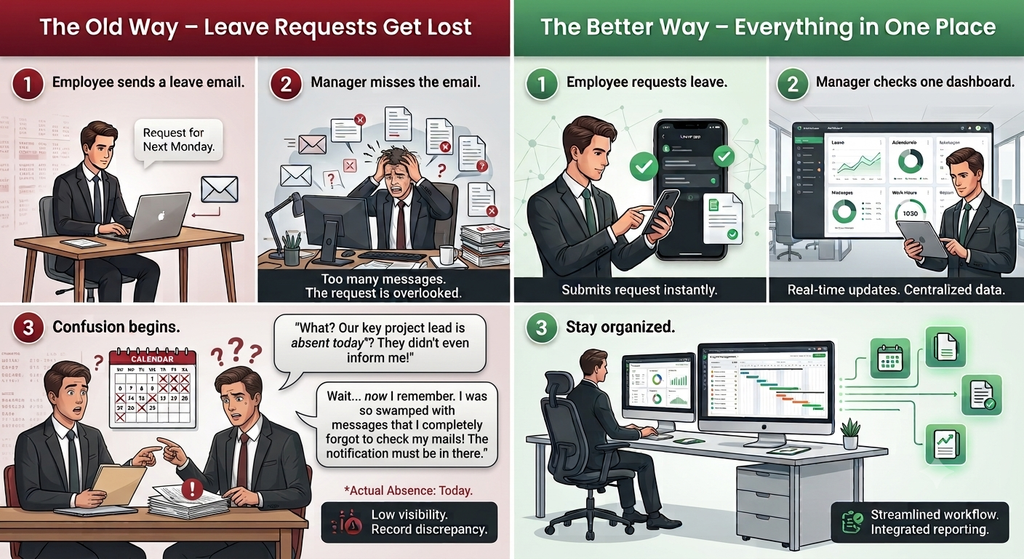
Most problems come from requests arriving in too many places. When time off is requested by email, chat, phone calls and paper forms, you run into the same issues again and again:
- Missed or delayed requests. A message gets buried, and the employee waits days for an answer.
- Coverage gaps. You approve a request without seeing that two other people are already off.
- Unclear records. Nobody is sure what was approved, for which dates or for how many hours.
- Records that don’t match. Attendance shows an absence, but the approval is in an email thread somewhere.
- Repeated back-and-forth. Every request turns into several messages to confirm dates, check cover and send the decision.
None of this is a people problem. It is a process problem, and a simple one to fix.
What a Good Leave Approval Process Looks Like
You don’t need a complicated system. You need a short, consistent routine that everyone follows.
- Use one channel for requests. Decide where time off is requested, and make it the only place. Requests sent anywhere else get redirected.
- Make requests complete. Employees should state the type (hours or full days), the dates and a short note, so you don’t need to ask follow-up questions.
- Set a response time. Agree on how fast requests are answered, for example within two working days.
- Check coverage before approving. Look at who else is away and whether the team can handle the gap.
- Record the decision where everyone can see it. The employee should see the outcome, and the record should be tied to attendance.
- Keep a history. Past approvals help you spot patterns, settle disputes and keep records accurate.
Mistakes That Slow Leave Approval Down
- Letting requests arrive anywhere. The more channels, the more gets lost.
- Keeping approvals separate from attendance. If the two live apart, someone has to reconcile them by hand every month.
- Treating every request as a full day. Short absences, like a few hours for an appointment, need their own request type or they end up as informal favors.
- Making one person the bottleneck. If only one manager can approve, requests wait whenever they’re away. Give the right people the right access.
- Skipping the record. Verbal approvals cause arguments later.
📩 Still managing leave requests manually? See a simpler way →
What to Look for in Leave Approval Software
Once your process is clear, a tool makes it easier to follow. When you compare options, check that the software:
- lets employees submit requests themselves from their phone or computer
- supports hours off as well as full days off
- lets managers review and approve requests in one place, with the right access for each role
- lets employees see the status of their own requests
- keeps time off and attendance tracking in the same system, so absences are explained automatically
- produces reports you can review and download
- works for more than one location, if your team is spread across sites
If a tool only collects requests but leaves attendance somewhere else, you will still be reconciling records by hand.
How BadgeMe Simplifies Leave Approval and Time Off
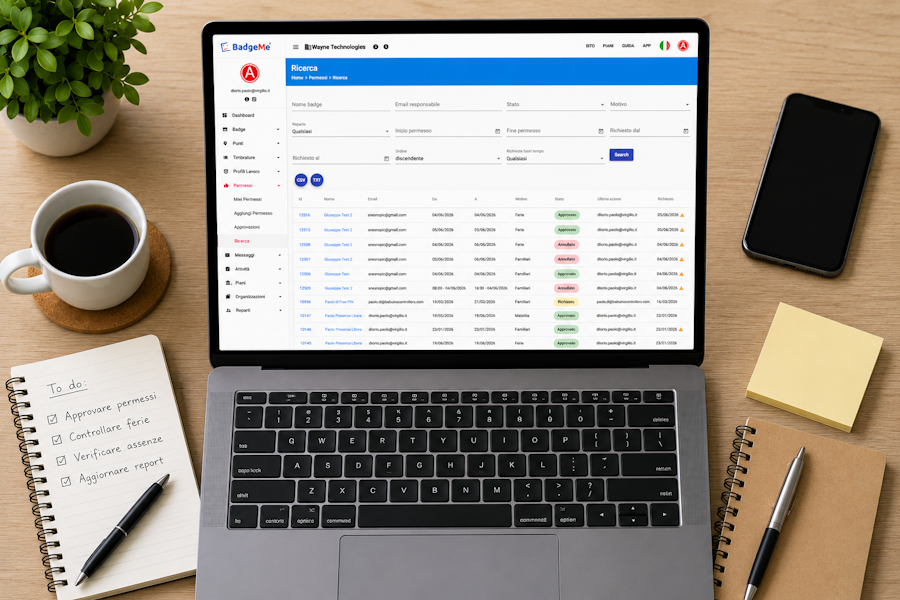
BadgeMe is a cloud platform from Babuino Controllers that brings attendance and time off into one place. Requests and approvals both happen inside BadgeMe, either in the app or in the web console, so you never need another email thread. In BadgeMe, time off requests are called permissions, and the process looks like this:
- The employee sends a request. They open Request Permission, choose the type, Hours off or Days off, add a short note and press Send.
- The manager reviews it. The request reaches the approver under My Approvals, so decisions happen in one place instead of across inboxes.
- The employee follows the outcome. Under My Permissions, they can see their own requests and what happened to each one.
What this means for you as an employer:
- No more repeated emails. One request, one approval, one record.
- Short absences are covered. Hours off lets employees ask for part of a day without it counting as a full day.
- Time off sits next to attendance. When someone has no clock-in on a given day, you can see it is approved time off, not an unexplained absence.
- The right access for each role. Departments, supervisors and managers each get the right access, so approvals don’t have to wait on one person.
- Reports in the web console. You can review worked hours and time off without rebuilding a spreadsheet.
- Messages in the same platform. You can talk to your team without leaving the system where their records live.
If you manage several workplaces, BadgeMe handles them from one account through its multi-site management, so leave approval works the same way at every site.
Time off is available on the paid plans, which start at $9.99/month. You can try attendance on the free plan first and upgrade when you are ready. See the full BadgeMe pricing, or read independent user reviews on Capterra and GetApp.
How to Simplify Leave Approval in Your Business
You can start this week:
- Pick one place for requests and tell your team.
- Write down your basic rules: notice periods, response times and who approves what.
- Check your current records and list where time off information is stored today.
- Move to a system that links requests, approvals and attendance, so one record explains everything.
- Review the process after a month, then adjust the rules to match how your team actually works.

Frequently Asked Questions
What is leave approval?
Leave approval is the process where an employee requests time off and a manager or employer reviews and accepts or declines it. A good process records the decision so it can be referenced later.
How can employers speed up leave approval?
Use one channel for requests, set a response time, give several managers approval access and use software that links requests to attendance.
Why should time off and attendance be in the same system?
When they are connected, an absence is explained by the approved request on record. That cuts down on manual checks and errors.
Can employees request time off through BadgeMe?
Yes. On the paid plans, employees choose Request Permission, select Hours off or Days off, add a note and send it. Managers then approve it under My Approvals.
Can employees ask for just a few hours off?
Yes. BadgeMe has an Hours off request type as well as Days off.
Can I use the BadgeMe app to request and approve time off?
Requests and approvals can be handled in the BadgeMe app or the web console.
Can BadgeMe manage leave approval across multiple locations?
Yes. You can manage several workplaces from one web console, with the right access for each manager.
Is leave approval software suitable for small businesses?
Yes. Even a small team benefits from one place for requests and a clear record, and the process can grow with the business.
📅 Keep leave requests and approvals in one place. Talk to BadgeMe →
Make Leave Approval Simple With BadgeMe
If you are tired of chasing time off requests across emails and spreadsheets, BadgeMe puts requests, approvals, attendance and reports in one place. Start with the free plan and see how it works.