
 Akanksha Soni
If you are looking for an Excel work hours calculation solution, you probably need a simple way to track and manage your employees’ working hours.
Many businesses start with Excel because it is free, easy to use, and readily available. It is often the first solution companies choose to record employee clock-in times, clock-out times, and total working hours.
However, even with a small number of employees, an Excel working hours spreadsheet can quickly become complicated, time-consuming, and prone to errors.
That is why more businesses are moving towards solutions like BadgeMe, a simple and affordable attendance management system that automates employee time tracking, saves time, and reduces manual errors.
In this guide, you will learn:
- How to calculate employee working hours in Excel
- How to use an Excel timesheet to manage monthly work schedules
- The main limitations of Excel attendance spreadsheets
- When it makes sense to switch to a simpler and more efficient attendance management solution
Table of Contents
Download a Free Excel Timesheet Template
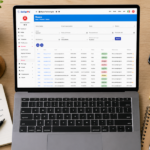
If you want to get started straight away, you can use a ready-made Excel template. With an Excel working hours spreadsheet, you can:
- Record employee clock-in and clock-out times
- Automatically calculate working hours
- Manage monthly work schedules
- Keep a clear summary of each employee’s working hours
Downloading a free Excel timesheet template is one of the quickest ways to start tracking working hours without investing in complex software.
That is why many businesses search for a download free Excel timesheet template when looking for a simple attendance management solution.
A ready-made Excel timesheet saves time during setup and provides a practical way to record employee attendance, working hours, and monthly totals.
Request your free Excel timesheet template. Fill out the contact form to receive your free attendance spreadsheet.
Request Free TimesheetWhat Is an Excel Timesheet for Calculating Working Hours?
One of the most common uses of an Excel timesheet is managing employees’ monthly working hours.
With an Excel spreadsheet, you can:
- Track the hours worked throughout the month
- Monitor absences and overtime
- Generate a summary for administrative and payroll purposes
An Excel monthly timesheet is a simple solution, particularly for small businesses.
However, it requires regular updates and careful data entry.
To manage working hours correctly, businesses should also consider the applicable working time regulations.
You can also read our detailed guide to the Excel attendance sheet.
How to Use an Excel Working Hours Spreadsheet Correctly
To get accurate results, it is important to use your Excel timesheet correctly.
Enter working hours accurately
Every employee’s clock-in and clock-out times must be recorded correctly.
Use formulas
Excel allows you to calculate automatically:
- Daily working hours
- Weekly working hours
- Total monthly working hours
Check the results
Even small mistakes in formulas can affect the accuracy of the entire spreadsheet.
An Excel working hours calculator is useful, but it requires continuous attention and regular checks.
Limitations of Excel for Employee Attendance Management
Excel is widely used, but it has some clear limitations as a business grows.
Manual data entry
All attendance information must be entered manually. This takes time and increases the risk of mistakes.
Calculation errors
An incorrect formula can affect the entire spreadsheet and lead to inaccurate working hour calculations.
No real-time monitoring
You cannot easily see employee attendance information in real time.
Difficult to manage multiple employees
When you have 10, 20, or more employees, maintaining an Excel file becomes increasingly complicated and less reliable.
This is often the point when businesses start looking for alternatives to Excel and consider more advanced employee attendance tracking systems.
Discover how BadgeMe can make attendance management easier.
Common Mistakes When Using Excel Timesheets
Mistakes in Excel attendance management are more common than many businesses realise.
When using a downloaded Excel timesheet template, even a small inaccuracy can affect the entire attendance tracking process.
Some of the most common mistakes include:
- Entering incorrect clock-in or clock-out times
- Accidentally changing or deleting formulas
- Leaving missing or outdated information
- Finding it difficult to manage overtime and holidays
Even a simple mistake can result in incorrect working hour calculations and create problems for administrative and payroll management.
That is why many businesses start with Excel but eventually look for more reliable alternatives.
Excel vs Automatic Attendance Management Systems: What Really Changes?
Many businesses start with Excel and eventually move to a more advanced attendance management system.
With Excel:
- Manual attendance management
- Time-consuming monthly updates
- Higher risk of calculation errors
With BadgeMe:
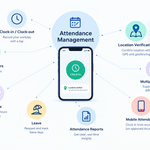
- Employee clock-in and clock-out through the mobile app or attendance terminal
- Real-time access to attendance information
- Leave and overtime management
- Reports that reduce manual administrative work
The biggest difference is the time saved and the improved organisation of employee attendance.
Alternatively, you can explore a time clock system for employees.
Who Should Use an Excel Timesheet?
A downloaded Excel working hours spreadsheet is particularly suitable for certain types of businesses.
For example:
- Businesses with fewer than 5–10 employees
- Companies with standard working schedules
- Small teams without complex attendance requirements
- Businesses looking for an immediate and free solution
In these situations, Excel can be sufficient in the short term.
However, as attendance management becomes more complicated, its limitations quickly become apparent.
When Is Excel No Longer Enough?
There are several clear signs that Excel may no longer be the right solution for your business:
- You have more than 10 employees
- You spend too much time managing attendance records
- You need more accurate and reliable data
- You manage multiple locations or construction sites
In these situations, continuing to rely on Excel can become a limitation for your business.
Looking for a simple and affordable alternative to Excel?
Discover how BadgeMe can make attendance management easier.
Alternatives to an Excel Timesheet
Today, businesses have access to simple and affordable attendance management solutions that support different clocking technologies.
Cloud-based software such as BadgeMe allows businesses to:
- Automate employee attendance management
- Access attendance data from different devices
- Reduce manual errors and administrative work
These solutions are designed to replace traditional spreadsheets without introducing unnecessary complexity.
If you are searching for a free Excel timesheet template, it is also worth considering cloud-based employee attendance software.
For just a manageable investment, you can access a complete employee attendance management system that simplifies daily operations and saves valuable time.
Cloud-based attendance management software makes it possible to:
- Automate attendance tracking
- Access information from anywhere
- Reduce errors and save administrative time
These systems provide a practical alternative to Excel, especially for businesses managing growing teams.
Discover BadgeMe Cloud-Based Attendance Management Software
Excel or BadgeMe: Which Should You Choose?
The right choice depends on your company’s requirements.
Excel is suitable if:
- You have only a few employees
- You want a free solution
- You can manage attendance data manually
BadgeMe is ideal if:
- You want to save time
- You want to reduce attendance management errors
- You want to automate employee time tracking
The real benefit is not just technological. It is about improving the way your business manages its employees and daily operations.
The Real Cost of Using Excel
Excel may be free, but it comes with a hidden cost: time.
Every month, you need to:
- Enter employee attendance data
- Check formulas and calculations
- Identify and correct mistakes
All this work takes time, and time has a business value.
In many cases, the time spent managing Excel spreadsheets can cost more than investing in an automated attendance management system.
Frequently Asked Questions
Is an Excel timesheet template free?
Yes. There are several free Excel timesheet templates available that businesses can download and customise to track employee working hours.
Is Excel enough to manage employee attendance?
Excel can be sufficient for very small businesses with straightforward working schedules. However, it becomes more difficult to manage as the number of employees and attendance requirements increase.
When should a business switch from Excel to attendance software?
When attendance management becomes time-consuming, when errors occur frequently, or when a business needs to manage multiple employees and locations.
Is BadgeMe difficult to use?
No. BadgeMe is designed to be simple and intuitive, helping businesses manage employee attendance without complicated processes.
Are you looking for a free Excel timesheet template?
If you need a simple way to manage employee attendance, a downloadable Excel timesheet can be a good starting point. However, you should also consider cloud-based attendance management software if you want to automate the process and save time.
Choosing a free Excel timesheet template can be an effective short-term solution, especially for businesses looking for something simple and affordable.
However, as the number of employees increases and attendance management becomes more complex, even the best Excel working hours spreadsheet can become limiting.
That is why many businesses start with Excel but eventually move towards automated solutions to improve accuracy, efficiency, and overall organisation.
Discover how BadgeMe can make attendance management easier.
Conclusion
If you are looking for a free Excel timesheet template, it can be an excellent starting point for managing employee attendance.
It allows you to get started quickly without additional software costs.
However, as your business grows, managing attendance through Excel becomes increasingly difficult.
If you want to:
- Save time
- Reduce attendance tracking errors
- Simplify employee attendance management
It may be time to move towards a more efficient solution.