 Akanksha Soni
Managing employees is no longer as simple as creating a weekly timetable and assigning everyone a fixed shift. Today, businesses work with different types of employees, including full-time staff, part-time workers, remote professionals and employees working directly at company locations.
As working arrangements become more flexible, coordinating different schedules can become increasingly complicated. Managers need to organise working hours, monitor employee attendance, manage shift changes and ensure that working time is recorded accurately.
This is where Employee Scheduling Software becomes an important tool.
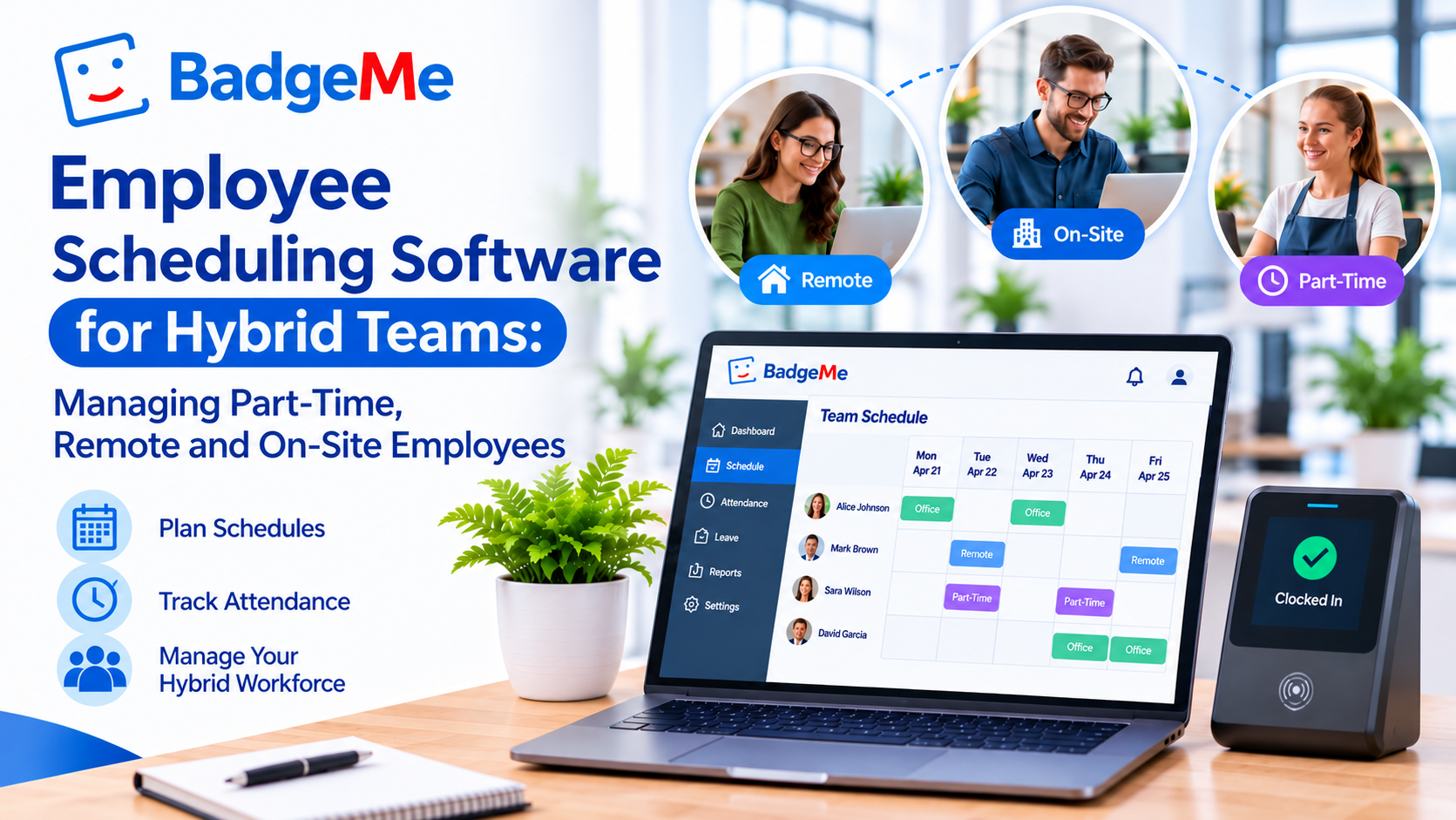
With the right Employee Scheduling Software, businesses can organise employee schedules, coordinate availability and improve workforce management. When combined with an employee attendance management system, it becomes easier to monitor actual working hours and maintain accurate attendance records.
In this article, we explore how Employee Scheduling Software helps businesses manage hybrid teams and why combining workforce planning with digital attendance tracking can make a difference.
Table of Contents
1. Why Do Businesses Need Employee Scheduling Software for Hybrid Teams?
Hybrid working has changed how companies organise their employees. Not everyone works at the same location or follows the same timetable.
A business might have:
- Full-time employees working standard office hours.
- Part-time employees working selected days or shorter shifts.
- Remote employees working from home.
- Field workers travelling between customer locations.
- On-site employees working in offices, shops or warehouses.
Managing all these working arrangements manually can create scheduling conflicts and administrative challenges.
According to Eurofound’s research on hybrid working management challenges, hybrid work requires clearer coordination, communication and management practices to ensure that employees working across different locations remain organised.
Implementing Employee Scheduling Software can help managers organise different working arrangements and maintain better visibility of their workforce.
Common challenges include:
- Scheduling conflicts: Different employee availability can make shift planning complicated.
- Attendance errors: Manually recording working hours increases the risk of mistakes.
- Limited visibility: Managers may struggle to understand who is working and where.
- Last-minute changes: Absences and unexpected schedule changes require quick updates.
- Administrative workload: HR teams spend valuable time collecting and checking attendance records.
An effective Employee Scheduling Software solution, supported by digital attendance management, helps businesses maintain better organisation even when employees work under different conditions.
2. How Employee Scheduling Software Supports Different Working Arrangements
Not every employee follows the same working pattern. Modern businesses need flexible workforce management solutions that can accommodate different employee requirements.
Managing Part-Time Employees Without Scheduling Conflicts
Part-time employees often have different working hours from full-time staff. Some work only in the mornings, others cover afternoon shifts, while some have different schedules every week.
Managing these arrangements manually can quickly become complicated.
Employee Scheduling Software helps managers:
- Organise employee availability.
- Keep track of working days and assigned hours.
- Coordinate different shifts.
- Identify potential scheduling conflicts.
- Manage changes when employees are unavailable.
For businesses with rotating shifts or flexible contracts, organised employee information makes workforce management easier.
Coordinating Remote Employees Across Different Locations
Remote employees introduce another challenge: managers cannot rely on physical presence to understand whether someone has started or finished their working day.
This makes digital attendance tracking particularly useful.
Combining Employee Scheduling Software with an attendance management solution allows businesses to organise working arrangements while keeping track of recorded working hours.
Remote employees can use a smartphone or computer to register their clock-in and clock-out times. Managers can then access attendance information without depending on manual messages or timesheets.
For more information, explore the smartphone attendance app offered by BadgeMe.
Organising On-Site Employees
For employees working in offices, retail stores, warehouses or production facilities, having a dedicated clock-in point can simplify attendance recording.
Instead of asking employees to complete timesheets manually, businesses can use an electronic time clock.
For example, employees can register their working hours using an NFC badge at a company entrance. Their attendance records are then automatically transferred to the central management platform.
This approach helps businesses maintain consistent attendance records across departments and locations.
3. Why Combine Employee Scheduling Software with Attendance Tracking?
Creating an employee schedule is only one part of workforce management.
Managers also need to understand whether employees actually follow their assigned working hours.
Consider this example:
A company schedules an employee to work from 9:00 AM to 1:00 PM. However, the employee arrives at 9:15 AM and finishes at 1:30 PM.
Without an attendance tracking system, the manager might have to rely on manual records or employee updates to understand the actual working time.
Combining Employee Scheduling Software with attendance management helps businesses compare planned working hours with recorded attendance information.
This makes it easier to identify:
- Late arrivals and early departures.
- Additional working hours and overtime.
- Employee absences.
- Differences between planned and actual working hours.
- Attendance patterns across different departments.
The important distinction is that scheduling tells you when employees should work, while attendance tracking records when they actually work.
Both processes contribute to better workforce organisation.
Businesses should also consider working-time requirements when organising shifts. The European Commission’s Working Time Directive explains important provisions concerning working hours, rest periods and annual leave across the European Union.
Discover how BadgeMe helps you manage employee attendance in one cloud platform.
Request a Free Demo4. How to Track Attendance Alongside Employee Scheduling Software
An effective Employee Scheduling Software strategy should consider the different working environments within a company.
Businesses need practical ways to record attendance for employees who work remotely, at a computer or at a fixed company location.
A single attendance method may not be suitable for everyone. A more flexible approach is to provide different clock-in methods connected to one central platform.
Smartphone Clock-In for Remote and Mobile Employees
Employees working remotely, travelling or visiting customers can record their attendance directly through a smartphone application.
This approach is particularly useful for:
- Remote employees working from home.
- Field technicians visiting customer locations.
- Sales representatives travelling during working hours.
- Employees working across different sites.
With the BadgeMe smartphone attendance app, employees can register clock-ins and clock-outs from their smartphones. Attendance records are synchronised with the cloud platform, with GPS location verification available to help businesses monitor where clock-ins take place.
This provides flexibility for employees while giving managers access to centralised attendance information.
PC Time Clock for Office and Remote Employees
Not every employee wants to use a personal smartphone for attendance tracking.
For companies that prefer computer-based clocking, a PC time clock offers another practical option.
Employees can use a computer to register their working hours through a personal code or a compatible NFC badge reader.
This can be useful for:
- Office employees.
- Remote workers using company computers.
- Administrative departments.
- Employees sharing workstations.
Using a PC as a clock-in point also helps businesses avoid installing a separate physical terminal at every workstation.
Discover the BadgeMe PC time clock solution to learn more.
BM001 NFC Time Clock for On-Site Employees
For employees working at a fixed company location, a dedicated time clock provides a straightforward way to record attendance.
The BadgeMe BM001 allows employees to clock in and out using NFC badges. The device connects to the BadgeMe cloud platform through Wi-Fi or Ethernet LAN, automatically synchronising attendance records.
It is suitable for environments such as:
- Offices and administrative buildings.
- Retail stores.
- Warehouses.
- Manufacturing facilities.
- Company premises with multiple departments.
Explore the BadgeMe NFC employee time clock to discover how businesses can simplify on-site attendance recording.
5. One Cloud Platform for Different Employee Working Environments
Imagine managing a company with 30 employees:
- 10 employees work in the office.
- 8 employees work part-time.
- 7 employees work remotely.
- 5 employees regularly visit customers.
Using separate attendance registers for every group would create unnecessary administrative work.
A centralised cloud-based attendance management system makes this process easier.
With BadgeMe, different clock-in methods can be connected to one platform. Whether employees use a smartphone, a PC or the BM001 NFC time clock, their attendance records are synchronised with the same cloud system.
Managers can use the platform to:
Monitor Attendance
Access employee attendance information and understand who has registered their working hours.
Calculate Working Hours and Overtime
Review recorded working hours and overtime information without manually collecting timesheets.
Manage Holidays and Leave Requests
Employees can submit leave requests online, while managers can review and approve them through the platform.
Generate Attendance Reports
Filter and export attendance information in formats such as Excel and CSV for administrative activities.
Manage Multiple Company Locations
Keep attendance information centralised even when employees work across different branches or facilities.
Combining Employee Scheduling Software with a centralised attendance management platform helps businesses maintain consistent workforce information as their teams grow.
Less paperwork, better visibility. Take control of employee attendance!
Request a Demo6. What Should You Look for in Employee Scheduling Software?
Choosing Employee Scheduling Software requires understanding your company’s working arrangements and administrative needs.
Not every business needs the same features. A small office with ten employees will have different requirements from a company managing several locations and rotating shifts.
Before selecting a solution, consider the following points:
| Feature | Why It Matters |
|---|---|
| Flexible working hours | Helps organise part-time and full-time employees |
| Employee availability | Helps coordinate different working arrangements |
| Remote attendance tracking | Allows employees to record working hours outside the office |
| Multiple clock-in methods | Supports different employee working environments |
| Real-time monitoring | Gives managers updated attendance information |
| Leave management | Simplifies holiday and absence requests |
| Overtime calculation | Helps monitor additional working hours |
| Cloud access | Makes employee information available from different locations |
| Attendance reports | Simplifies administrative and payroll preparation |
Another important consideration is scalability.
As your business grows, you may need to manage additional employees, departments or locations. Choosing Employee Scheduling Software that supports your workforce planning requirements and can work alongside a flexible attendance management system can help maintain a consistent process.
Remember: If you need automatic shift creation, shift swapping or employee availability planning, check that these specific functions are included in the scheduling software you choose. Attendance management and shift scheduling are related, but they are not the same functionality.
For additional guidance, the International Labour Organization’s guide to developing balanced working time arrangements offers practical recommendations for structuring employee schedules while considering both business and worker requirements.
7. How Can Businesses Improve Hybrid Workforce Management?
Implementing Employee Scheduling Software is an important step towards organising a flexible workforce.
However, businesses should also establish clear processes to ensure that scheduling and attendance management work together.
Here are five practical steps:
Step 1: Identify Different Employee Categories
Separate employees according to their working arrangements, such as full-time, part-time, remote and on-site.
Step 2: Establish Clear Working Hours
Define expected working hours, break times and attendance requirements for each employee or department.
Step 3: Choose Appropriate Clock-In Methods
Provide employees with a convenient way to record their attendance, whether through a smartphone, computer or physical NFC time clock.
Step 4: Centralise Attendance Information
Use one cloud platform to collect employee clock-ins, clock-outs, working hours and leave information.
Step 5: Review Attendance Reports Regularly
Monitor recorded working hours, overtime, absences and other attendance information to identify potential issues and improve workforce organisation.
By combining clear scheduling policies with reliable attendance tracking, businesses can reduce manual administration and maintain better control over their workforce.
8. Simplify Hybrid Employee Management with BadgeMe
Managing a hybrid workforce requires flexible attendance recording methods and centralised information.
BadgeMe helps businesses centralise employee attendance through one cloud-based platform, regardless of where employees work.
Instead of relying on a single clock-in method, BadgeMe supports different ways of recording employee attendance:
- Smartphone attendance app: Employees can record working hours directly from their smartphones, including when working remotely or visiting customers.
- PC time clock: Employees can use a computer to register clock-ins and clock-outs through a personal code or compatible NFC reader.
- BM001 NFC time clock: On-site employees can register attendance using NFC badges at a dedicated terminal.
All these methods connect to the BadgeMe cloud platform, where managers can monitor attendance, working hours, overtime, holidays and leave requests.
This makes it easier to manage employees working in different locations without maintaining separate attendance records.
Whether you manage a small office, a retail business, a warehouse or a company with multiple branches, BadgeMe provides a centralised way to organise employee attendance.
Discover the BadgeMe employee attendance management solutions and see how different clock-in methods can support your workforce.
Ready to Simplify Employee Attendance Management?
Make employee attendance easier to manage with a flexible system that connects smartphone, PC and NFC time clock solutions.
Request a BadgeMe Demo and discover how your business can simplify attendance management.
Conclusion: Choose the Right Employee Scheduling Software for Your Business
Managing part-time, remote and on-site employees requires proper organisation, flexible working arrangements and reliable attendance records.
Choosing the right Employee Scheduling Software can help businesses coordinate employee schedules, manage availability and improve workforce planning.
However, scheduling is only part of the process. Businesses also need accurate attendance information to understand actual working hours, monitor overtime and manage employee absences.
By combining Employee Scheduling Software with a centralised attendance management platform like BadgeMe, companies can create a more organised and efficient workforce management process.
The result is better workforce visibility, less manual administration and a more consistent approach to managing employees across different working environments.
One team, different workplaces. Manage attendance with BadgeMe!
Discover BadgeMeFrequently Asked Questions
1. What is Employee Scheduling Software?
Employee Scheduling Software is a digital solution that helps businesses organise employee working hours, assign shifts, manage availability and coordinate workforce schedules. Depending on the platform, it may also include attendance tracking and workforce management features.
2. How can businesses manage schedules for part-time employees?
Businesses can organise part-time employees by defining their availability, assigning working hours and maintaining an updated schedule. Digital scheduling tools help managers coordinate different shifts and handle changes more efficiently.
3. Is Employee Scheduling Software useful for remote teams?
Yes. Employee Scheduling Software helps managers organise remote working arrangements. When combined with digital attendance tracking, it also helps monitor recorded working hours without requiring employees to visit the office.
4. Can one attendance system manage remote and on-site employees?
Yes. A flexible attendance management platform can support different clock-in methods. For example, BadgeMe supports smartphone clock-ins, PC time clock recording and the BM001 NFC terminal, with attendance data synchronised in one cloud platform.
5. What is the difference between employee scheduling and attendance tracking?
Employee scheduling defines when employees are expected to work. Attendance tracking records their actual clock-in and clock-out times. Both processes are important for monitoring working hours and managing workforce operations.
6. Can Employee Scheduling Software work with an NFC time clock?
Scheduling software and NFC attendance terminals can complement each other. For example, BadgeMe’s BM001 NFC terminal records employee attendance and synchronises the information with its cloud platform.
7. Why should businesses use cloud-based employee management software?
Cloud-based software centralises workforce information and allows authorised managers to access attendance records from different locations. It also simplifies reporting, leave management and monitoring employee working hours.