
 Akanksha Soni
Free Time Card Calculator
Enter clock-in and clock-out times to calculate employee work hours, breaks and weekly overtime.
| Day | Clock In | Clock Out | Break | Hours Worked |
|---|---|---|---|---|
| Monday | min | 0:00 | ||
| Tuesday | min | 0:00 | ||
| Wednesday | min | 0:00 | ||
| Thursday | min | 0:00 | ||
| Friday | min | 0:00 | ||
| Saturday | min | 0:00 | ||
| Sunday | min | 0:00 |
This calculator is provided for general informational purposes. Overtime rules may vary depending on local regulations and company policies.
Calculate Employee Work Hours in Seconds
Calculating employee work hours manually can quickly become time-consuming. Breaks, overtime, night shifts, and company policies can make attendance calculations more complicated than they seem.
Our free Time Card Calculator makes it easy to calculate employee work hours in seconds. Simply enter the clock-in and clock-out times, add any breaks, and instantly calculate regular working hours and overtime.
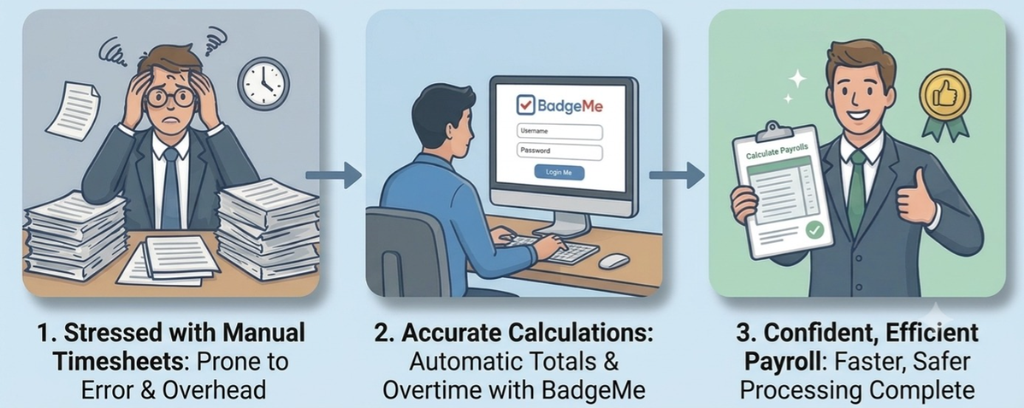
Whether you are using an Employee Hours Calculator to prepare payroll or a Work Hours Calculator to verify attendance records, understanding how working hours are calculated is essential for maintaining accurate records and reducing administrative work.
In this guide, you’ll learn how to calculate employee work hours, account for breaks and overtime, calculate overnight shifts, and understand when it may be time to move from spreadsheets to attendance management software.
What Is a Time Card Calculator?
A Time Card Calculator is a digital tool that automatically computes the hours worked by an employee over a specific period.
Traditionally, attendance was logged using paper timesheets and calculated manually. Modern digital tools streamline this process by instantly converting clock-in and clock-out entries into total payable hours.
A typical Time Card Calculator requires just a few key inputs:
- Clock-in time
- Clock-out time
- Break duration
- Applicable overtime rules
More advanced tools can also track:
- Paid vs. unpaid breaks
- Overnight shifts
- Attendance grace periods and tolerances
- Sick leave and vacation time
The primary goal of a Time Card Calculator is to deliver precise attendance records while minimizing manual administrative work
How Does an Employee Hours Calculator Work?
An Employee Hours Calculator converts attendance information into worked hours using a simple formula:
Worked Hours = (Clock-Out − Clock-IN) − Break Duration
Example:
| Clock In | Clock Out | Break | Total |
| 08:30 | 17:00 | 00:30 | 08:00 |
Although the formula seems simple, calculations quickly become more complex when accounting for overtime, overnight shifts, and varying company attendance rules.
An Employee Hours Calculator automates these rules to ensure every worker is evaluated consistently—reducing human error and improving reliability across the organization.
How to Calculate Work Hours Manually?
While a Work Hours Calculator automates the process, understanding the manual calculation method is essential for verifying payroll records.
- Step 1: Record Clock-In and Clock-Out Times – Note the exact time the employee begins and finishes work.
- Step 2: Calculate Total Elapsed Time – Subtract the clock-in time from the clock-out time to find total shift duration (converting to 24-hour time makes this easier).
- Step 3: Deduct Unpaid Breaks – Subtract any unpaid lunch periods or rest breaks from the total shift duration.
- Step 4: Convert Minutes to Decimals – Divide remaining minutes by 60 to convert worked hours into a decimal format ready for payroll (e.g., 30 minutes = 0.5 hours).
Let BadgeMe do it for you.
How to Calculate Work Hours With Breaks
Breaks are important because the time between clock-in and clock-out does not necessarily correspond to paid working time.
Consider an employee who clocks in at 8:00 AM and clocks out at 5:00 PM.
The total elapsed time is nine hours.
If the employee takes a 60-minute unpaid lunch break:
9 hours - 1 hour = 8 working hours
The result is therefore:
Our Time Card Calculator lets you enter the break duration separately for every day. This is useful when break durations change throughout the week.
Whether a particular break should be considered paid or unpaid depends on applicable rules and company policies. The calculator therefore subtracts the break duration you enter rather than making assumptions about how the break should be treated.
| Clock In | Clock Out | Break | Hours Worked |
| 8:00 AM | 5:00 PM | 60 min | 8:00 |
How to Calculate Overtime?
Overtime calculations require an additional step.
First, calculate the employee's total working hours for the relevant period. Then compare the result with the overtime threshold that applies.
For example, suppose an employee works 45 hours during the week and overtime is calculated after 40 hours.
The calculation is:
45 total hours - 40 regular hours = 5 overtime hours
Our Time Card Calculator allows you to change the weekly overtime threshold instead of assuming that the same threshold applies to everyone.
This is important because overtime requirements can vary according to jurisdiction, employment arrangements and company policies. For example, in the USA, the U.S. Department of Labor's overtime guidance explains the overtime requirements under the Fair Labor Standards Act (FLSA). In the UK, overtime is generally based on an employee's normal working hours and employment contract. See the UK Government's guidance on overtime rights for more information. In India, working-hour and overtime provisions can differ according to the applicable labour rules. The Ministry of Labour & Employment's Labour Codes FAQs provide official guidance on working hours and overtime.
An Employee Hours Calculator can therefore be useful for checking weekly totals before attendance information is transferred to payroll or another administrative system.
How to Calculate Overnight Work Hours
Night shifts can make manual calculations particularly confusing because the clock-out time occurs on the following calendar day.
For example:
| Clock In | Clock Out | Break | Hours Worked |
| 10:00 PM | 6:00 AM | 0 min | 8:00 |
At first glance, 6:00 AM appears to be earlier than 10:00 PM. In reality, the employee has worked across midnight.
The correct calculation is eight hours.
Our Work Hours Calculator recognizes this situation automatically. When the clock-out time is earlier than the clock-in time, the calculator treats the clock-out as occurring on the following day.
This makes the calculator useful not only for conventional office schedules but also for businesses operating night shifts, such as manufacturing, logistics, hospitality and other organizations that operate outside standard daytime hours.
Time Card Calculator vs Spreadsheet
Spreadsheets are commonly used for calculating employee working hours, particularly in small businesses.
They can certainly perform the calculations, but somebody still needs to enter the information, create the formulas and make sure those formulas remain correct.
A Time Card Calculator provides a simpler solution when you only need to calculate working hours quickly.
| Method | Manual Setup | Automatic Calculation | Suitable for Multiple Employees |
| Paper time card | High | No | Limited |
| Spreadsheet | Medium | Partial | Yes |
| Time Card Calculator | Low | Yes | Limited |
| Attendance software | Low | Yes | Yes |
A free Employee Hours Calculator is particularly useful for occasional calculations. You enter the working times, check the result and can then transfer the information wherever it is needed.
The situation changes when the same process has to be repeated every day for many employees. At that point, manually transferring attendance information into a calculator or spreadsheet becomes another administrative task.
Switch to smarter time tracking with BadgeMe.
Time Card Calculator vs Time Tracking Software
A calculator and time tracking software solve two different problems.
A Work Hours Calculator answers a specific question: How many hours did this employee work? Software time tracking manages the entire process that produces that answer, automatically transforming employee attendance records into working hours, overtime, breaks and employee timesheets.
Instead of manually entering clock-in and clock-out times into a calculator, employees record their attendance using a mobile time clock app, PC time clock or physical employee time clock. The system then processes those records automatically.
Attendance software can typically manage information such as working hours, overtime, breaks, absences, leave, night shifts and employee timesheets.
A Time Card Calculator therefore remains useful when you want a quick calculation without implementing an attendance system. For businesses that perform these calculations continuously across an entire workforce, automated software time tracking can remove much of the repetitive work.
BadgeMe's Work Hours Management solution automatically processes employee attendance and transforms clock-in records into working hours, overtime and detailed reports.
When Should You Move From an Employee Hours Calculator to Attendance Software?
An Employee Hours Calculator may be all you need when calculations are occasional or involve only a few people.
As the workforce grows, however, the administrative process surrounding those calculations usually becomes more important than the calculation itself.
You may want to consider attendance software when you regularly need to manage multiple employees, different work schedules, overtime, night shifts, absences or monthly timesheets.
The key difference is automation.
With a calculator, somebody still enters the clock-in and clock-out times. With attendance software, those records are collected directly when employees clock in and out and are then processed according to the company's attendance rules.
This reduces duplicate data entry and provides managers with continuously updated attendance information rather than a calculation performed only when needed.
Let BadgeMe handle the hours for you.
Frequently Asked Questions About Time Card Calculators
What is a Time Card Calculator?
A Time Card Calculator is a tool that calculates working hours from employee clock-in and clock-out times. It can also subtract breaks and calculate regular and overtime hours according to a selected overtime threshold.
How do I calculate employee hours?
Subtract the employee's clock-in time from the clock-out time and then subtract any unpaid breaks. An Employee Hours Calculator performs this calculation automatically for each working day and adds the daily totals together.
How do I calculate work hours with a lunch break?
First calculate the total time between clock-in and clock-out, then subtract the unpaid lunch break. For example, 9:00 AM to 6:00 PM is nine hours. After subtracting a one-hour lunch break, the employee has worked eight hours.
Can a Work Hours Calculator calculate overnight shifts?
Yes. A Work Hours Calculator can calculate a shift that continues beyond midnight. For example, a shift from 10:00 PM to 6:00 AM represents eight hours before any unpaid breaks are deducted.
How does a Time Card Calculator calculate overtime?
The calculator first totals the employee's working hours and then compares them with the overtime threshold entered by the user. Hours above that threshold are displayed separately as overtime.
What's the difference between a Time Card Calculator and a timesheet?
A Time Card Calculator performs the calculation of working hours. A timesheet is a record showing an employee's working time over a specific period. Attendance software can automatically generate timesheets from employee clock-in and clock-out records.
Is a Time Card Calculator suitable for payroll?
A calculator can help verify working-hour totals before payroll preparation, but payroll and overtime requirements depend on applicable laws, employment agreements and company policies. Businesses should ensure that the rules they apply are appropriate to their circumstances.