 Akanksha Soni
What to look for, how BadgeMe handles multiple locations, what it costs, and how to get started.
If you’re comparing HR cloud software for employee attendance, you probably know the problem. Attendance lives in one spreadsheet, leave requests arrive by email, schedule changes come through chat, and a manager spends part of every month stitching it together. If you run more than one site, it’s worse: either every location needs its own punching machine, or someone collects records by hand.
You don’t need another explanation of why that’s inefficient. You need to know which platform will fix it, and what it will cost.
This guide covers what good HR cloud software should include, how BadgeMe handles multiple locations, how its plans compare, and how to get started. BadgeMe is built by Babuino Controllers to give employers one place to track working schedules, attendance, leave, and reports.
Make every clock-in simpler with BadgeMe.
Table of Contents
What Is HR Cloud Software for Employee Attendance?
HR cloud software gives businesses a centralized way to manage employee attendance, working hours, leave, schedules, and reports without relying on spreadsheets or separate systems.
HR cloud software for employee attendance is an online platform for recording and managing attendance and related workforce activity. Employees clock in and out digitally, and owners and managers see the data in real time through a web console.
The best platforms go beyond clock-in and clock-out. They also handle leave, days off, shifts, reports, and multiple workplaces, so the business isn’t juggling a separate tool for each.
What to Look for Before You Choose
Use this checklist when comparing vendors:
- Digital attendance without expensive hardware. Employees should be able to clock in from a smartphone, a badge and timekeeper, or a PC.
- Multiple locations. You should be able to define several clocking points and manage them all from one account.
- Leave and time-off management. Requests and approvals should live next to attendance, so a manager can see why someone has no record on a given day.
- Shifts and work-off days. The system should handle different schedules, including breaks, overtime, and night shifts.
- Downloadable reports. Managers should be able to review worked hours and export reports without rebuilding spreadsheets.
- Roles and departments. Departments, supervisors, and managers should each see the right information.
- Clear location rules. Location should confirm a clock-in happened at an approved place, not follow people through the day.
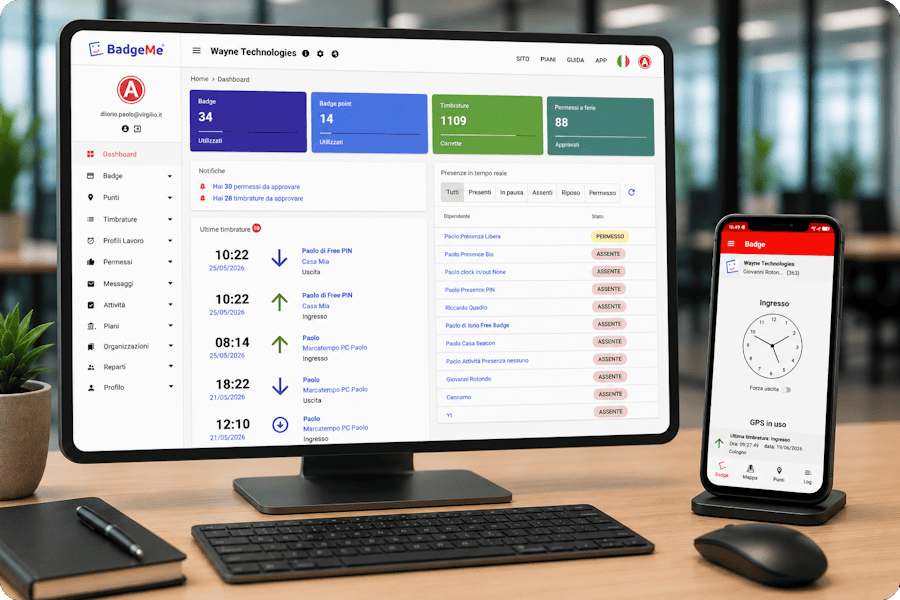
- Real-time web console. Owners should be able to see who is in without being on-site.
- Pricing that scales. You should see a clear starting price, be able to start small, and be able to add as many employees as you need without splitting into separate systems.
If a tool covers only the first item, you’ll be back in spreadsheets for everything else.
Multiple Clocking Points: How BadgeMe’s HR Cloud Software Manages Your Locations
For businesses with multiple workplaces, HR cloud software can make it easier to manage attendance from one central system. This is where BadgeMe differs most from a traditional punching machine.
A physical machine is fixed to one spot, and each new site means buying, installing, and maintaining another device. BadgeMe replaces that with virtual clocking points (also called badge points). You place a clocking point on a map in the web console, and employees can clock in only when they are within its range.
That gives you several practical advantages:
- Add locations without buying hardware. A new branch or store is a new clocking point in the console.
- Cover sites that change. If you work at customer properties or temporary job sites, you can accept clocking only near those places, even when the sites don’t stay the same over time.
- See everything in real time. Owners and managers can check who is in and when they clocked, across all locations, without being there.
- Verify the location of each clock-in. The server checks the employee’s position against the clocking point when the clock-in is requested.
- Add precision indoors. Where you need indoor coverage or exact points, beacons can be used.
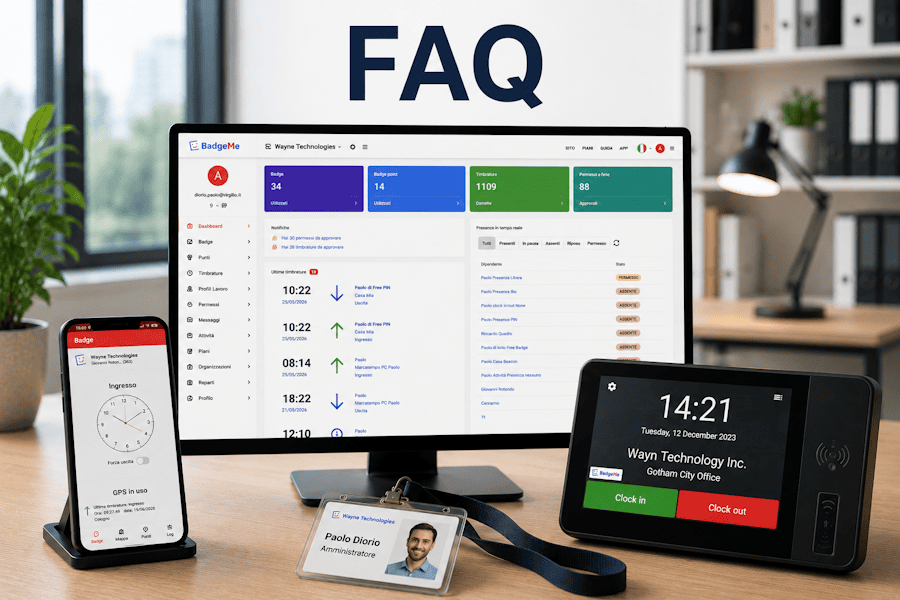
- Keep a physical option. Where it suits you, employees can use a badge and timekeeper instead of the app, at one or several locations. A free PC time clock is also available for shared computers and reception desks.
Simplify location-based attendance with BadgeMe.
How BadgeMe Compares With Your Current Setup
| What you need | Spreadsheets, email and chat | Physical punching machines | BadgeMe |
|---|---|---|---|
| Attendance recording | Manual entry | On-site only | App, badge and timekeeper, or PC time clock |
| Multiple locations | Several files and version confusion | A device to buy and maintain at every site | Multiple virtual clocking points from one account |
| Temporary or changing sites | Manual tracking | Not practical | Clocking points set on a map |
| Time off and leave | Email threads | Not covered | Built-in time-off management (paid plans) |
| Shifts, breaks, overtime | Manual calculation | Limited | Configurable shifts, breaks, overtime, night shifts |
| Reports | Built by hand | Limited | Downloadable reports (paid plans) |
| Manager access | Whoever has the file | At the machine | Real-time web console |
| Upfront cost and growth | Free, but costs manager time | Hardware, installation, and maintenance for every site | Free plan available, paid plans from $9.99/month, and a Custom plan with per-badge pricing for any team size in one console |
What BadgeMe Includes
These features make BadgeMe a practical HR cloud software solution for businesses managing attendance across one or multiple locations.
- Attendance recording through the smartphone app (with biometrics or PIN), a badge and timekeeper, or a PC time clock
- Multiple clocking points for one or many locations, managed on a map
- Time-off management, including holidays
- Shifts and work-off days, with breaks, overtime, and night shifts
- Worked hours and downloadable reports, including monthly exports
- Departments, supervisors, and managers with the right access for each
- Activity reporting for teams working in the field
- Private messages to employees
- Support on paid plans
A manager can tell at a glance whether someone is working, on approved leave, or off by schedule, without checking three places.
BadgeMe Pricing: HR Cloud Software for Employee Attendance, Free to Start
BadgeMe offers three standard plans and a Custom option. The free plan has no time limit, so you can try the service before you pay.
| Free | Basic | Advanced | Custom | |
|---|---|---|---|---|
| Price | $0/month | $9.99/month | $18.99/month | Contact us for custom pricing |
| Best for | Getting started | Shops and small businesses | Small businesses | Medium-sized and large organizations |
| Employee badges | 3 | Up to 9 | Up to 21 | As many as you need |
| Clocking points | 1 | 2 | 3 | Based on your requirements |
| Time off | No | Yes | Yes | Yes |
| Downloadable reports | No | Yes | Yes | Yes |
| Support | No | Yes | Yes | Priority support |
Need more than 21 badges? Build a Custom plan.
If your organization has outgrown the standard plans, the Custom option lets you add any number of employee badges and manage them all in one web console. You don’t need a separate account for each team or site. Everyone stays in one system, with one set of reports and one view of who is in, across every location.
Custom is a good fit if you:
- have more than 21 employees
- operate across many branches, stores, or customer sites
- expect your headcount to keep growing
- want all departments, supervisors, and managers under a single console
Tell us your number of employees and locations, and we’ll build a plan around them. Custom plans are priced per badge, so you only pay for the people you manage. Every Custom plan includes onboarding help and priority support.
Which plan fits?
- Free: you have a very small team and one location and want to see how BadgeMe works.
- Basic: you run a shop or small business with up to two clocking points and need time off, reports, and support.
- Advanced: you have a growing small business and need up to 21 badges and a third clocking point.
- Custom: you need more than 21 badges, or a setup tailored to your size, in one console.
You can begin on the free plan and move up as your team or locations grow.
Is BadgeMe Right for Your Business?
HR cloud software for employee attendance suits organizations that manage people across sites, such as:
- Restaurants and retail businesses with employees across a few branches or stores
- Cleaning and field-service companies with teams at customer properties
- Construction and off-site teams working at changing locations
- Schools, training organizations, and healthcare or home-care providers that need simple attendance records
- Growing offices that have outgrown spreadsheets
- Businesses replacing a punching machine with something more flexible
If you have a very small team, one location, and few leave requests, the free plan or even a spreadsheet may be enough. Once you’re chasing records across people or places, a central platform saves real manager time.
Do You Need to Record Working Time?
In many countries, yes. In the European Union, a 2019 Court of Justice ruling (C-55/18) requires employers to have an objective, reliable and accessible way to measure each worker’s daily working time. In the US, the Department of Labor’s Fact Sheet #21 lists the hours records employers must keep. Rules vary by country and industry, so check what applies to your business. A digital system like BadgeMe keeps clock-ins in one place, available in the web console.
Common Concerns Before Switching
“Will my employees see this as surveillance?”
The system checks where an employee is when they request a clock-in, and accepts it only if they are within a clocking point’s range. It is not designed to follow employees throughout the day. European data protection authorities, including Italy’s Garante, have criticized employers who collect more location data than they need, which is why we follow the principle of data minimization and check location only when someone clocks in. We recommend explaining exactly how it works before launch, which builds trust and speeds up adoption.
“Do we have to buy hardware?”
No. Clocking points are virtual and set up from the web console. If you prefer physical badges and timekeepers, or a PC time clock, those are available as options.
“Is it expensive to try?”
No. The free plan has no time limit, and paid plans start at $9.99/month.
“What if we have more employees than your plans allow?”
Choose the Custom plan. You can add as many badges as you need and keep everyone in one console, instead of splitting your team across accounts.
“Will switching be disruptive?”
Moving off spreadsheets is usually simpler than expected, because you replace several scattered processes with one. You can begin with a single location and add more as you go.
“Will my managers actually use it?”
Attendance, time off, and reports sit in one web console, which removes the collecting and reconciling managers do today.
“What happens when we add a location?”
You add a clocking point on the map. There’s no new device to install and no new set of files. Your plan’s clocking-point limit applies, and you can upgrade or move to a Custom plan at any time.
Track clock-ins by approved locations with BadgeMe.
How HR Cloud software Getting Started Works
You can be set up in a few steps, and you can start on the free plan before deciding anything.
- Create your free account. Sign up for BadgeMe and open your dashboard.
- Create your organization. Add your business and set up its structure, including departments, supervisors, and managers.
- Create your employee badges. Add a badge for each employee, within your plan’s limit.
- Set up your clocking points. Place each location on the map in the web console. If you prefer a physical or desktop option, configure a timekeeper or the PC time clock from the dashboard and activate it with the code provided.
- Set your rules. Configure shifts, breaks, overtime, and work-off days. On paid plans, also set up time off and holidays.
- Brief your team. Tell employees how clocking works and how the location check is used. They identify themselves with biometrics or a PIN when they clock in.
- Go live and review. Watch clock-ins arrive in real time, and download reports on paid plans. When you need more badges, clocking points, or features, upgrade your plan or request a Custom one.
Frequently Asked Questions
What is HR cloud software for employee attendance?
It is an online solution for managing attendance and related workforce activity, including leave, shifts, reports, and workplace management.
How much does BadgeMe cost?
BadgeMe has a free plan at $0/month and paid plans at $9.99/month (Basic) and $18.99/month (Advanced). For larger teams there is a Custom plan priced per badge. See the pricing section above for a full comparison.
Is there really a free plan?
Yes. The free plan has no time limit. It includes 3 employee badges and 1 clocking point. Time off, downloadable reports, and support are available on paid plans.
Can I add more badges than the standard plans include?
Yes. With the Custom plan, your company can add as many badges as it needs and manage all of them from one web console. Request a Custom quote and tell us your number of employees and locations. We’ll reply with a plan built around your team.
Can BadgeMe manage multiple locations?
Yes. You can create multiple clocking points and manage them from one web console. The standard plans include 1 clocking point on Free, 2 on Basic, and 3 on Advanced. Custom plans are based on your requirements.
Do I need to buy attendance machines?
No. Clocking points are virtual, and employees clock in with the smartphone app. Physical badges, timekeepers, and a PC time clock are available if you want them.
Can employees clock in from anywhere?
Only within a clocking point’s range. You define the areas on a map, so clock-ins are accepted only near your approved sites.
Can we use it for temporary sites or customer locations?
Yes. You can set up clocking near locations that change over time.
Can BadgeMe work indoors or at precise points?
Yes. Beacons can be used where you need indoor coverage or exact points.
Can employees request time off through BadgeMe?
Yes, on paid plans. Time off and holidays are managed in the platform.
Can we manage different shifts, overtime, and night work?
Yes. Shifts, breaks, overtime, and night shifts can be configured.
Can managers download reports?
Yes, on paid plans. Managers and owners can review worked hours and download reports.
Can we message employees through BadgeMe?
Yes. BadgeMe supports private communications with employees.
Does location-based attendance mean constant tracking?
No. Location is checked when an employee requests a clock-in, to confirm they are at an approved clocking point.
Is it suitable for small businesses?
Yes. Small teams can start on the free plan, and Basic and Advanced are designed for shops and small businesses. Custom is available for larger organizations.
Ready to try HR cloud software for employee attendance? Start on the free plan today.
If your attendance, leave, and scheduling are scattered across tools and sites, BadgeMe brings them into one platform, with no hardware to buy for each location. Start on the free plan today, upgrade as you grow, or ask for a Custom plan sized to your whole team.