
 Akanksha Soni
Attendance Management: How Digital and Location-Based Attendance Works
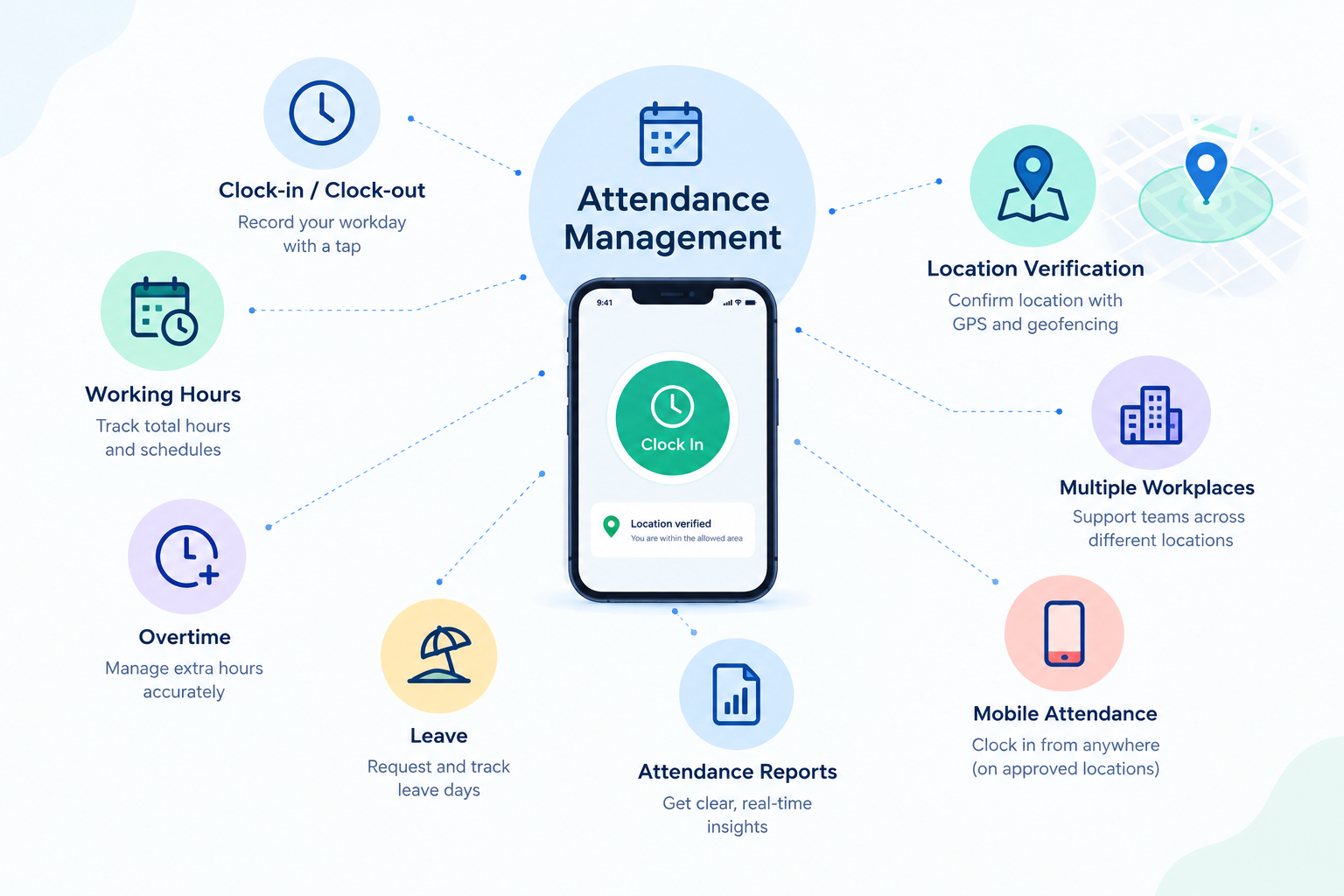
Attendance management is the process of recording and managing employee attendance, working hours, overtime, leave, and related time information.
Traditional attendance methods usually focus on when an employee clocks in and out. Modern attendance management systems can provide additional capabilities such as mobile attendance, multiple workplace management, location verification, attendance reporting, and different clock-in methods.
This can be particularly useful for businesses with field employees, multiple branches, customer-site teams, restaurants, retail stores, warehouses, construction sites, and other workplaces where employees may not always start and finish their working day at the same location.
A location-based attendance system can associate an attendance event with location information, helping businesses understand where an employee recorded attendance. However, GPS attendance, geofencing, and continuous employee tracking are different concepts.
Understanding how these features work can help businesses choose an attendance management system that matches their workforce and operational requirements.
What Is Attendance Management?
Attendance management is the process of recording, organizing, and managing employee attendance information.
A traditional process may involve employees using a physical time clock, signing a register, or submitting timesheets. Modern attendance management software can digitize these processes and provide businesses with a centralized way to manage employee time and attendance.
Depending on the system, attendance management can include:
- Clock-in and clock-out
- Working hours and overtime
- Attendance records and reports
- Leave and absence management
- Multiple workplace management
- Mobile and physical attendance
- Location verification
- Payroll support
For businesses with employees working across different locations, location-based attendance can provide additional information about where attendance events take place.
What Is a Location-Based Attendance System?
A location-based attendance system uses location information as part of the employee attendance process.
Instead of recording only the time an employee clocks in or out, the system can associate an attendance event with location information when the relevant functionality is enabled.
For example, an attendance record may include:
- Employee name
- Date
- Clock-in time
- Clock-out time
- Associated location
- Working duration
This gives managers additional context about an attendance event.
Location-based attendance can be useful for employees who work at customer premises, different branches, construction sites, restaurants, warehouses, or other locations away from a central office.
For example, a cleaning company may have employees who start their shifts at different customer locations. A field-service company may have technicians who travel directly to customer sites. A mobile attendance system can provide an alternative to requiring these employees to visit a central office simply to record attendance, depending on the company’s attendance policy.
See how BadgeMe can help you manage clock-ins, working hours and locations.
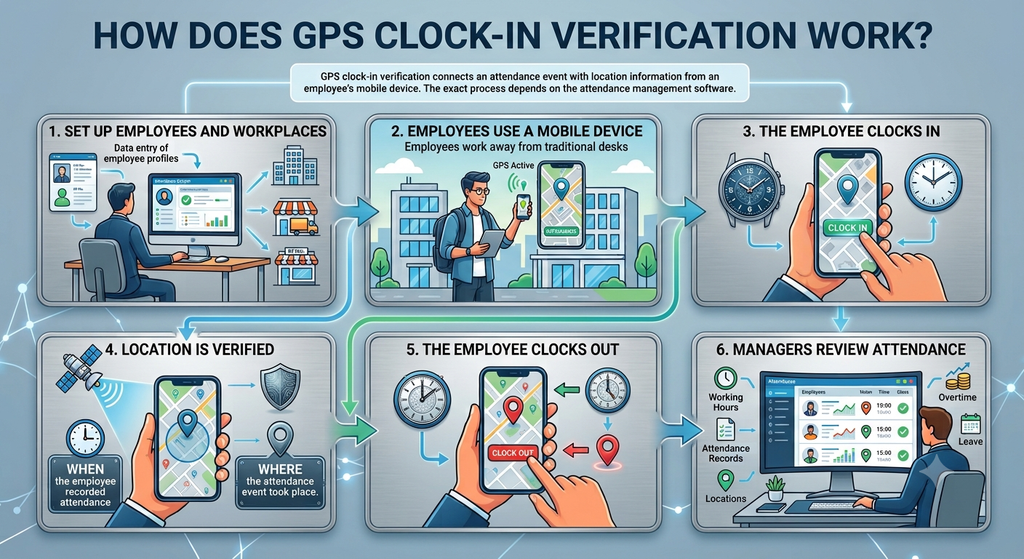
How Does GPS Clock-In Verification Work?
GPS clock-in verification connects an attendance event with location information from an employee’s supported mobile device.
The exact process depends on the attendance management software, but a typical workflow includes the following steps.
1. Set Up Employees and Workplaces
The business adds employees, workplaces, attendance rules, and other relevant settings to the attendance management system.
For businesses with multiple locations, different offices, stores, warehouses, or customer sites can be configured according to the company’s requirements and the capabilities of the software.
2. Employees Use a Mobile Device
Employees use a supported smartphone to access the mobile attendance system.
This can be useful for employees who work away from a traditional desk or physical attendance terminal.
3. The Employee Clocks In
The employee records their attendance through the mobile attendance app.
The system records the attendance event and the corresponding time.
4. Location Is Verified
When location verification is enabled and permitted, the employee’s device can provide location information associated with the attendance event.
This can give the business information about both:
When the employee recorded attendance
and
Where the attendance event took place.
5. The Employee Clocks Out
At the end of the working period, the employee records their clock-out.
Where supported, the system can also associate location information with the clock-out event.
6. Managers Review Attendance
Managers can review attendance information through the company’s attendance management platform.
Depending on the software, this may include working hours, attendance records, locations, overtime, leave, and other employee time information.
Traditional Time Clock vs. Location-Based Attendance
Traditional time clocks can work well when employees start and finish work at a fixed location.
However, businesses with mobile employees or multiple workplaces may require a more flexible attendance process.
| Feature | Traditional Time Clock | Location-Based Attendance |
|---|---|---|
| Clock-in and clock-out | Yes | Yes |
| Fixed workplace | Well suited | Well suited |
| Mobile employees | Less convenient | Well suited |
| Smartphone clock-in | Usually unavailable | Available |
| Location information | Usually unavailable | Available when supported |
| Multiple workplaces | May require multiple terminals | Can support centralized management |
| Field employees | Less convenient | Well suited |
| Digital attendance records | Yes | Yes |
For example, a business with several offices could install a physical attendance terminal at each location.
Alternatively, if mobile attendance is appropriate for its workforce, employees working across different locations could use a mobile attendance system.
The appropriate solution depends on how employees work, the company’s attendance policies, and the capabilities of the attendance system.
GPS Attendance vs. Geofencing: What Is the Difference?
GPS attendance and geofencing are often discussed together, but they serve different purposes within an attendance management system.
The simplest way to understand the difference is:
GPS attendance asks: Where was the employee when attendance was recorded?
Geofencing asks: Is the employee within an approved location to record attendance?
Understanding this difference is important when businesses evaluate attendance management software.
What Is GPS Attendance?
GPS attendance can associate location information with an attendance event.
For example, when an employee clocks in using a mobile attendance app, the system may associate the clock-in record with the employee’s location at that moment.
The main purpose is to provide location context alongside the attendance record.
This can be useful for businesses that need to verify where mobile or field employees recorded attendance.
What Is Geofencing?
Geofencing creates a virtual geographical boundary around a physical location.
A business could define an area around:
- An office
- Restaurant
- Retail store
- Warehouse
- Construction site
- Customer premises
Depending on the software, geofencing can be used to determine whether an employee is inside an approved area and whether a clock-in action should be permitted.
For example, a company may define a geographical area around a construction site. If the attendance system supports geofencing rules, an employee may need to be within that area before they can record attendance.
GPS Attendance vs. Geofencing at a Glance
| Feature | GPS Attendance | Geofencing |
|---|---|---|
| Main purpose | Associates location with attendance | Defines an approved geographical area |
| Main question | Where was attendance recorded? | Is the employee inside the permitted area? |
| Location information | Yes, when supported | Used to determine location relative to the boundary |
| Attendance rules | Provides additional location context | Can support location-based attendance rules |
| Common use | Mobile and field attendance | Location-restricted clock-in |
GPS location verification and geofencing should therefore not be treated as identical features.
Businesses should check the specific location and geofencing capabilities of an attendance management system before choosing a solution.
Use BadgeMe to manage attendance with GPS location verification.
Benefits of Attendance Management Software
Modern attendance management software can help businesses move away from fragmented or manual attendance processes.
Centralized Attendance Records
Businesses can manage employee attendance information through a centralized system instead of relying entirely on paper registers or separate spreadsheets.
This can make it easier for managers and HR teams to review attendance information.
Easier Working-Hour Tracking
Clock-in and clock-out records can be used to calculate working duration.
Depending on the system, businesses may also be able to manage overtime and other working-time information.
Mobile and Multi-Location Attendance
Mobile attendance can be useful for employees working away from traditional attendance terminals.
Businesses with several workplaces can also use attendance management software to organize attendance information across different locations, where supported.
Reduced Manual Administration
Digital attendance records can reduce the need to collect paper registers or manually transfer attendance information into spreadsheets.
This can simplify attendance administration and reduce manual data entry.
Better Reporting and Visibility
Attendance reports can help managers review employee attendance, working hours, overtime, and other time-related information from a centralized platform.
When location verification is available, attendance records can also provide additional information about where attendance events were recorded.
Location-Based Attendance for Field Employees
Field employees are one of the clearest use cases for mobile attendance.
These employees may include:
- Sales representatives
- Service technicians
- Maintenance teams
- Cleaning employees
- Installation teams
- Construction workers
- Delivery teams
- Employees working at customer premises
A traditional office-based attendance machine may not be practical for these employees.
For example, a service technician may begin the working day at a customer’s location rather than at the company’s office. A mobile attendance system can allow the employee to record attendance from the designated workplace, according to the company’s attendance policy.
Similarly, a cleaning company may have employees assigned to several customer locations throughout the week.
Location-based attendance can provide additional information about where attendance events were recorded, making it easier for the business to organize attendance information across different workplaces.
Attendance Management for Multiple Workplaces
Businesses operating across multiple locations often need a consistent way to manage employee attendance.
Consider a company with:
- A head office
- Several retail stores
- Multiple warehouses
- Regional branches
- Customer locations
- Construction sites
Employees may work at different locations depending on their schedules and responsibilities.
A centralized attendance management system can help businesses organize attendance information across these workplaces.
For example, a restaurant group with several locations may need to manage attendance for employees working at different restaurants. A cleaning company may need to manage employees assigned to different customer sites.
Depending on the software, employees can use different attendance methods according to their workplace and role.
This can reduce the need to maintain completely separate attendance processes for every location.
Location Verification vs. Continuous Employee Tracking
One important consideration when evaluating GPS attendance software is understanding the difference between location verification and continuous employee tracking.
Recording the location associated with a clock-in or clock-out does not automatically mean that an employee is continuously monitored throughout the working day.
For example, a business may only need to know:
Where did the employee clock in?
and:
Where did the employee clock out?
That is different from continuously collecting an employee’s location while they are working.
Businesses should clearly define:
- What location information is collected
- When it is collected
- Why it is collected
- Who can access it
- How it is used
- How long it is retained
Employees should also receive clear information about the company’s attendance and location policies.
The exact behavior of a location-based attendance system depends on the software’s functionality, configuration, and company policy.
Attendance Management for Remote and Hybrid Teams
Modern businesses may have employees working from offices, homes, customer locations, or different branches.
This can make attendance management more complicated than simply installing one physical time clock.
A mobile time clock app can provide another method for employees to record attendance using supported smartphones.
For example:
- Office employees can use a physical attendance terminal.
- Field employees can use mobile attendance.
- Employees assigned to different branches can use the attendance method configured for their workplace.
- Remote employees can follow the company’s designated remote attendance process.
Businesses do not necessarily need to use the same attendance method for every employee.
The appropriate configuration depends on the company’s workforce, attendance policies, workplaces, and the capabilities of its attendance management system.
Can GPS Attendance Work With a Physical Time Clock?
Yes. A business does not necessarily need to replace every physical attendance terminal when introducing mobile attendance.
Different employees can use different attendance methods depending on where and how they work.
| Employee Type | Possible Attendance Method |
|---|---|
| Office employees | Physical employee time clock |
| Field employees | Mobile attendance |
| Computer-based workers | PC time clock |
| Employees at different workplaces | Mobile or location-based attendance |
This mixed approach can be useful for businesses with different types of employees.
For fixed workplaces, a physical employee time clock can provide a familiar attendance method. Employees working away from traditional terminals can use mobile attendance where appropriate.
How BadgeMe Supports Attendance Management
BadgeMe provides different ways for businesses to manage employee attendance depending on their workplace and employee requirements.
Mobile Time Clock
Employees working away from a traditional attendance terminal can use the Mobile Time Clock App to record attendance using a supported smartphone.
When location-based attendance is configured, the attendance event can be associated with the designated workplace or badge point.
BM001 Employee Time Clock
For employees working at a fixed location, businesses can use the BM001 Employee Time Clock for physical badge-based attendance.
This provides a traditional clock-in method for workplaces where a physical attendance terminal is appropriate.
PC Time Clock
Computer-based attendance is another option through the PC Time Clock, allowing businesses to provide a digital attendance method for employees who work primarily from computers.
Centralized Attendance Management
These different attendance methods can be managed as part of a centralized employee attendance system, allowing businesses to choose the most appropriate clock-in method for different employees and workplaces.
BadgeMe’s location-based attendance approach is focused on attendance verification rather than continuously monitoring an employee’s location throughout the working day.
Businesses can configure a badge point where employees can record their presence. This can be useful when a company needs to verify that an employee recorded attendance from a designated workplace without requiring continuous location tracking.
What Should Businesses Look for in an Attendance Management System?
Location functionality is only one part of an effective attendance management solution.
Before choosing attendance management software, businesses should consider the following features.
Mobile Attendance
Can employees record attendance conveniently using supported smartphones when working away from a traditional time clock?
Location Verification
Does the system provide the location functionality the business actually needs?
Businesses should determine whether they need location information, workplace verification, geofencing, or another location-based rule.
Working-Hour Calculation
Can the system calculate working duration from clock-in and clock-out records?
Overtime Management
Can managers identify and manage overtime based on employee attendance information?
Attendance Reports
Can HR teams and managers easily review attendance information and generate useful reports?
Multiple Workplace Management
Can the business manage employees working across different offices, branches, stores, warehouses, or customer locations?
Leave and Absence Management
Can attendance information be managed alongside employee leave and absence records?
Payroll Compatibility
Can attendance and working-hour information be used as part of payroll and administrative processes?
Centralized Management
Can managers manage attendance information from one platform rather than maintaining separate systems for different workplaces?
Who Can Benefit From Location-Based Attendance?
Location-based attendance can be particularly useful for businesses where employees work across different physical locations.
Typical examples include:
Restaurants and Hospitality
Employees may work across different restaurants, hotels, kitchens, or hospitality locations.
Retail Businesses
Employees may work across multiple stores or branches.
Cleaning Companies
Cleaning teams may begin their shifts at different customer premises.
Construction and Field-Service Businesses
Employees and technicians may work at different construction sites or customer locations rather than a permanent office.
Property and Maintenance Companies
Employees may visit different residential, commercial, or customer properties during their working day.
Multi-Location Organizations
Businesses with several offices, branches, stores, or workplaces may need a centralized way to manage attendance across locations.
For a small business where every employee works in the same office, a traditional time clock may already be sufficient.
For businesses with mobile employees or multiple workplaces, location-based attendance can provide additional flexibility and location information.
Frequently Asked Questions
What is attendance management?
Attendance management is the process of recording and managing employee attendance, working hours, absences, overtime, and related employee time information.
What is a location-based attendance system?
A location-based attendance system uses location information as part of the attendance process. Depending on the software, it can associate an employee’s clock-in or clock-out event with a workplace or location.
How does GPS clock-in work?
An employee uses a supported mobile device to record attendance. When location verification is enabled, the system can associate the attendance event with location information from the device.
What is the difference between GPS attendance and geofencing?
GPS attendance can provide location information associated with an attendance event. Geofencing creates a virtual geographical boundary that can be used to establish location-based attendance rules.
Does GPS attendance mean employees are tracked all day?
Not necessarily. Recording location during an attendance event is different from continuously tracking an employee throughout the working day. The exact behavior depends on the software configuration and company policy.
Can GPS attendance be used for field employees?
Yes. Mobile attendance with location verification can be useful for employees working at customer premises, construction sites, retail locations, and other workplaces away from a central office.
Can GPS attendance work with a physical time clock?
Yes. Businesses can use physical time clocks for employees working at fixed locations and mobile attendance for employees working in the field, provided the attendance platform supports both methods.
Is GPS attendance the same as geofencing?
No. GPS attendance can associate location information with an attendance event, while geofencing establishes a geographical boundary that can be used for location-based attendance rules.